Retargeting links are short or redirect URLs that fire ad pixels the moment someone clicks, adding that person to an audience in Meta, Google, TikTok, or Pinterest, even when you don’t own the destination page. The fastest way to test this is to create a short link in Link Squeeze, attach your pixel IDs, share it, then build a small audience in one ad platform and verify that the pixel fired using a debug tool like Meta Pixel Helper or Google Tag Assistant.
Here’s what you need to get started:
- The concept: a redirect page loads your pixel code before sending the visitor to the final URL, so the ad platform registers the click as an audience event.
- Ad platforms supported: Meta (Facebook/Instagram), Google Ads, TikTok, and Pinterest.
- Verification tool: Meta Pixel Helper (Chrome extension) or Google Tag Assistant to confirm pixel fires.
- Recommended tool: Link Squeeze handles pixel injection, branded short links, UTM tagging, and analytics in one place.
How do retargeting links actually work?
When someone clicks a retargeting link, they don’t go straight to the destination. Instead, their browser briefly loads a redirect page hosted by your link manager. That redirect page contains your pixel code. The pixel fires, signals the ad platform, and the browser receives a 302 redirect to the final URL. The whole sequence takes milliseconds.

The pixel sets a browser cookie or sends a server-side signal that tells the ad platform to add this visitor to a specific audience. From that point, you can serve ads to them on Meta, Google, or TikTok without ever having had a pixel on the destination page itself.
This is the key advantage of the redirect-pixel model: you don’t need to control the destination. You can retarget people who clicked a link to a news article, an Amazon product page, a YouTube video, or a partner’s website. The pixel lives on your redirect page, not theirs.
A few technical realities to keep in mind:
- Cookie-based tracking works well in desktop browsers but is limited in Safari and Firefox due to Intelligent Tracking Prevention (ITP). Audience match rates on those browsers are lower.
- Apple’s App Tracking Transparency (ATT) on iOS reduces pixel match rates for mobile users who opt out. Server-side signals (Meta Conversions API) can partially recover this signal.
- Ad blockers can prevent pixel scripts from loading on the redirect page. This is unavoidable for a portion of your audience, typically 10–30%, depending on your traffic source.
Pro Tip: Test your retargeting link in an incognito window with no ad blocker active to confirm baseline pixel firing. Then test with an ad blocker enabled to understand your realistic data loss before scaling.
Why marketers use retargeting links and where they work best
The core appeal is reach. Most marketers can only pixel visitors who land on pages they own. Retargeting links break that constraint and let you build audiences from any click, anywhere.
Primary benefits:
- Build audiences from third-party content you share (press mentions, affiliate pages, partner sites).
- Recapture clicks from email campaigns with destinations outside your domain.
- Improve ad relevance by segmenting audiences based on which specific link they clicked.
- Get better attribution for shared links by combining pixel data with UTM parameters.
The use cases span every channel:
Email campaigns: Every link in a nurture sequence or promotional email can carry a pixel. Clicks become a high-intent audience for short-term conversion retargeting, typically a 7–14 day window.
Social bios and posts: A single link in your social bio can fire pixels for every visitor, building a warm audience from organic traffic you’d otherwise lose.

Influencer and affiliate links: When an influencer shares your retargeting link, every click seeds your ad audience — even though the influencer controls the post and you don’t control their audience.
Press mentions and earned media: If a publication links to your product, a retargeting link in your pitch or press kit means you can follow up with everyone who reads that coverage.
QR codes in offline media: Print ads, packaging, and event signage can feature QR codes that link to retargeting ads. Every scan seeds your digital audience.
App store and directory links: Links to your App Store listing or directory profile can carry pixels, allowing you to retarget people who showed intent but didn’t convert.
Which ad platforms and pixels work with retargeting links?
Link Squeeze supports Meta, TikTok, Pinterest, and Google Pixels on every short link. Each platform has its own pixel mechanics and audience rules.
Meta Pixel / Conversions API: The most widely used option for retargeting links. The browser-side pixel works well for desktop; the Conversions API (server-side) improves match rates on iOS and Safari. Meta requires a minimum audience size of 1,000 before you can serve ads to a custom audience.
Google Ads tag (remarketing tag): Google’s pixel fires on the redirect page and adds visitors to a remarketing list. Google Display Network and YouTube campaigns can then target these lists. Audience minimums are sized appropriately for Display and Search.
TikTok Pixel: TikTok’s pixel works similarly to Meta’s browser-side tag. It’s particularly effective for audiences in the 18–34 demographic. TikTok requires a substantial number of matched users before an audience becomes active for ad targeting.
Pinterest Tag: Useful for e-commerce and lifestyle brands. Pinterest audiences built from link clicks can be used for Promoted Pin campaigns. Audience minimums require a modest number of users.
LinkedIn Insight Tag: LinkedIn’s tag can technically be placed on a redirect page, but LinkedIn’s audience minimums and higher CPMs make it better suited to B2B campaigns with high-value audiences. LinkedIn is not currently listed as a natively supported pixel in Link Squeeze’s platform, so verify current integration status before building a LinkedIn-dependent workflow.
A practical note on platform differences: Meta and TikTok rely heavily on browser cookies for audience matching, which means iOS privacy changes affect both. Google’s audience matching benefits from its signed-in user base, resulting in higher cross-device match rates. Pinterest tends to have smaller audience pools but strong purchase intent signals in certain verticals.
Step-by-step checklist to set up retargeting links
Follow this sequence to go from zero to a verified, live retargeting link.
Pre-flight:
- Choose a link manager that supports pixel injection (Link Squeeze covers Meta, TikTok, Pinterest, and Google).
- Confirm you have pixel IDs and admin access to your ad accounts.
- Prepare UTM parameters for source, medium, campaign, and content. Use a free UTM builder to keep parameters consistent.
Implementation steps:
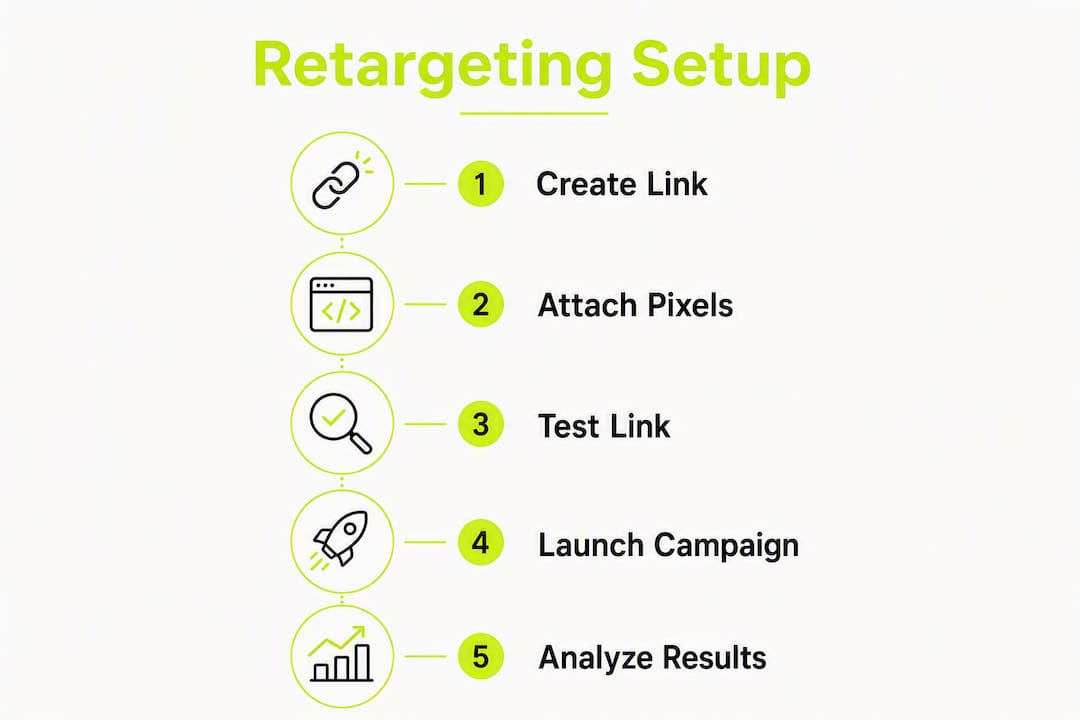
- Create your pixel in the ad platform (Meta Events Manager, Google Ads, TikTok Ads Manager, or Pinterest Ads). Copy the pixel ID.
- Create a short link in your link manager. Set your destination URL as the final redirect target.
- Add your pixel ID(s) to the link’s pixel settings. A tool like Link Squeeze lets you attach multiple pixels to a single link, so one click can seed audiences in Meta and TikTok simultaneously.
- Append UTM parameters to the destination URL so your analytics platform can correctly attribute the traffic.
- Set up a custom audience in the ad platform using the pixel as the source. Define the audience window (7, 14, or 30 days depending on your campaign cycle).
- Run a click test. Click the link yourself in a standard browser, then check the ad platform’s audience diagnostics and use a pixel debug tool to confirm the event fired.
- Launch a low-budget seed campaign once your audience reaches the platform minimum. A $50–$100 test budget is enough to verify delivery and gather initial performance data.
Verification steps:
- Install Meta Pixel Helper (Chrome extension) and click your link. The extension should show a PageView event on the redirect page.
- Use Google Tag Assistant to verify Google Ads remarketing tag fires.
- Check the ad platform’s pixel diagnostics page for recent activity (usually updates within a few minutes of a test click).
- Test in multiple browsers (Chrome, Safari, Firefox) and in incognito mode to understand cross-browser behavior.
- After seeding, check the audience size in the ad platform after 24–48 hours to confirm members are being added.
Automating pixel firing within a marketing workflow reduces manual errors and speeds audience creation, especially when you’re managing multiple campaigns across channels.
What U.S. marketers need to know about privacy and compliance
Retargeting pixels collect behavioral data, and U.S. law is increasingly specific about what that requires. The California Consumer Privacy Act (CCPA) and its amendment, the CPRA, are the most relevant frameworks for most U.S. digital marketers.
Immediate compliance actions:
- Disclose pixel tracking in your privacy policy. Name the ad platforms whose pixels you use and describe the data collected (IP address, browser identifiers, click behaviour).
- Provide an opt-out mechanism for California residents. Under the CCPA/CPRA, users have the right to opt out of the “sale or sharing” of personal information, including behavioural data shared with ad platforms for targeting.
- If you control the redirect page, consider adding a consent banner before firing the pixel for visitors from California. This is especially important if your audience is primarily California-based.
Operational controls:
- Respect browser-level Global Privacy Control (GPC) signals. CPRA requires businesses to honor GPC as a valid opt-out signal.
- Log pixel events for auditability. Keep records of when pixels were active, which links carried them, and what data was collected.
- Review your data processing agreements with Meta, Google, TikTok, and Pinterest to confirm they meet CPRA’s vendor contract requirements.
- For iOS traffic, Apple’s ATT framework means users must explicitly opt in to cross-app tracking. Design your campaigns to work with reduced iOS signal rather than against it.
Compliance checklist:
- Privacy policy updated to name all active pixels and ad platforms.
- Opt-out mechanism live and tested for California visitors.
- GPC signal honored at the server or consent management layer.
- Vendor data processing agreements reviewed and signed.
- Pixel event logs retained per your data retention policy.
This is general compliance guidance, not legal advice. Confirm your specific obligations with a qualified privacy attorney or your legal team, particularly if you operate across multiple states with active privacy laws.
How to measure success and tune your campaigns
Good measurement starts before you launch. Define your KPIs and audience parameters first, then let the data tell you whether link-based audiences are moving the needle.
Measurement checklist:
- Seed audience size: aim for a sufficiently large audience in Meta or TikTok before activating a campaign. Smaller audiences lead to high frequency and ad fatigue quickly.
- Lookback windows: a week or two for high-intent conversion campaigns, and multiple weeks for awareness or consideration retargeting.
- Core metrics: click-through rate (CTR), cost per click (CPC), cost per acquisition (CPA), and return on ad spend (ROAS). Track these against your non-retargeted campaigns to isolate the lift.
- Frequency caps: set a limited number of impressions per user per week to avoid audience fatigue.
Best practices:
- Use UTMs on every retargeting link so your analytics platform (Google Analytics 4, for example) can attribute sessions independently of pixel data.
- Avoid audience overlap between campaigns. If the same user is in multiple retargeting audiences, they’ll see competing ads, inflating your frequency metrics.
- Stagger lookback windows for sequential messaging: show a brand awareness ad to 30-day clickers, a product ad to 14-day clickers, and a discount offer to 7-day clickers.
- Use free marketing tools like UTM builders and link preview generators to keep your tracking consistent and your social previews on-brand.
Pro Tip: Run a simple A/B test: send half your email list a standard link and half a retargeting link, then compare the ad platform audience growth and downstream conversion rates over 14 days. This isolates the exact value of link-based pixel firing for your specific audience.
Audience targeting fundamentals, clear seed behaviour, an appropriate lookback window, and minimum audience sizes are what drive effective retargeting. Design your creative sequences around those windows from the start.
How to set up retargeting links in Link Squeeze
Link Squeeze is built around the redirect-pixel model. Here’s the practical flow:
Setup walkthrough:
- Create your Link Squeeze account and connect a custom domain for branded short links.
- Navigate to the link creation screen and enter your destination URL.
- In the pixel settings panel, add your pixel IDs for Meta, TikTok, Pinterest, and/or Google. Link Squeeze supports multiple pixels on a single link, so one click can fire all four simultaneously.
- Add UTM parameters directly in the link builder, or use the built-in UTM tool.
- Publish the link and copy the short URL.
- Click the link yourself to trigger a test fire, then verify in each ad platform’s pixel diagnostics.
You can find out more from our help guide.
Analytics and verification in Link Squeeze:
- The analytics dashboard shows click volume, geographic breakdown, device type, and referral source.
- Pixel firing logs confirm which pixels fired on each click event.
- Audience seeding status is visible in the connected ad platforms (check Meta Events Manager or Google Ads Audience Manager after 24 hours).
Shopify merchants get an additional layer: Link Squeeze’s Shopify integration maps link clicks to orders, so you can see which retargeting link drove a specific purchase and calculate ROAS at the link level. This is particularly useful for Shopify stores running influencer campaigns or affiliate programs where attribution is otherwise difficult.
Operational tips:
- Start on a plan tier that supports multiple pixel integrations and a custom domain. Branded domains improve click-through rates and build trust with your audience.
- Use team access controls to give media buyers pixel-editing access without exposing billing or account settings.
- Name your links consistently (campaign + channel + date) so your analytics stay organized as your link library grows.
What does link retargeting software typically cost?
Link retargeting tools are priced as SaaS subscriptions, separate from your ad spend. Vendor pricing typically scales on three dimensions: monthly link or click volume, number of pixel integrations, and custom domain support.
Common pricing shapes:
- Entry-level tiers cover basic link shortening, one- or two-pixel integrations, and a shared domain. These are suitable for testing but limit branded link options.
- Mid-tier plans add custom domains, multiple pixel types, UTM tools, and analytics exports. This is the right tier for most active performance marketers.
- Higher tiers support large click volumes, team access, API integrations, and advanced analytics. Enterprise teams with high-volume affiliate or influencer programs typically need this level.
Ad spend is a separate budget line. The tool subscription covers pixel firing and link management. Your actual retargeting ads cost CPM or CPC on top of that. For initial testing, a moderate ad spend budget is enough to seed a small audience and run a short campaign to validate performance. Meta and Google tend to be more cost-efficient for initial tests; TikTok can require a higher minimum daily budget to exit the learning phase.
Features that justify moving to a higher plan tier: high monthly click volumes (high monthly click volumes), the need to fire multiple pixels on every link, branded domain requirements for client-facing campaigns, and analytics exports for reporting to stakeholders.
Key Takeaways
Retargeting links let you build ad audiences from any click you generate, on any platform, without owning the destination page — making them one of the most flexible audience-building tools available to performance marketers.
| Point | Details |
|---|---|
| Redirect-pixel model | A short link fires your ad pixels on the redirect page before sending visitors to the destination. |
| Multi-platform support | Meta, Google, TikTok, and Pinterest pixels can all fire simultaneously from a single retargeting link. |
| Verify before scaling | Use Meta Pixel Helper or Google Tag Assistant to confirm pixel fires before building your audience. |
| Compliance is required | Update your privacy policy, honor GPC signals, and provide a CCPA opt-out for California visitors. |
| Link Squeeze recommended | Link Squeeze supports multi-pixel links, branded domains, UTM tools, and Shopify order attribution in one platform. |
Link Squeeze puts pixel firing on every link you share
For performance marketers who need to build retargeting audiences beyond their own website, Link Squeeze delivers the most direct path. You get multi-pixel support (Meta, TikTok, Pinterest, and Google) on every link you create, so a single click seeds audiences across all four platforms at once. That’s a meaningful advantage over managing separate tracking setups per channel.
The Shopify integration goes further than pixel firing alone. It maps clicks to orders, giving Shopify merchants actual ROAS data at the link level rather than platform-estimated attribution. For influencer campaigns, affiliate programs, or any situation where the click and the purchase happen on different platforms, that order-level data changes how you allocate budget.
Link Squeeze also includes a free UTM builder, branded short link creation, Open Graph preview controls, and a QR code generator. For teams running multi-channel campaigns, having these utilities in one place significantly reduces setup time per campaign.
Start your free trial with Link Squeeze for performance marketers to create your first pixel-enabled short link and verify it fires before you commit to a paid plan.
FAQ
What is an example of retargeting?
A marketer shares a retargeting link to a press article about their product. Everyone who clicks that link gets added to a Meta custom audience, and the marketer then serves them a product ad on Facebook and Instagram within the next 14 days.
Is retargeting still effective in 2026?
Yes. Retargeting consistently outperforms cold audience campaigns on CPA and ROAS because it targets people who have already shown intent. The main challenge is managing audience size and frequency caps to avoid ad fatigue.
Can you fire multiple pixels on a single retargeting link?
Yes. Tools like Link Squeeze let you attach Meta, TikTok, Pinterest, and Google pixels to one link, so a single click seeds audiences across all four platforms simultaneously.
What is a retargeting site or retargeting link?
A retargeting link is a short or redirect URL that, when clicked, fires ad pixels, adding the visitor to an ad platform audience. It differs from a standard short link in that the redirect page includes pixel code that signals ad platforms before the visitor reaches the destination.
Do retargeting links work for links you don’t own?
Yes. That’s the primary use case. Because the pixel fires on the redirect page (which you control), it doesn’t matter whether you own the destination. You can retarget clicks to news articles, affiliate pages, app store listings, or any external URL.