A link preview shows you exactly how your URL will look when shared on social media and messaging platforms before anyone else sees it. The tool works by fetching your page’s Open Graph and Twitter Card meta tags, then rendering a visual card complete with title, description, and image. Platforms that support these rich previews include Facebook, X, LinkedIn, Slack, Discord, WhatsApp, and Telegram.
For marketers running campaigns with retargeting pixels and analytics, this matters more than it might seem. A broken or generic preview can quietly kill click-through rates on links you have spent real budget promoting. Most basic URL preview tools are free with no registration, while advanced features like bulk processing and API access typically require a paid plan.
Key features and use cases at a glance:
- Instant visual rendering of how a link appears across multiple platforms
- Meta tag inspection showing which Open Graph and Twitter Card tags are present or missing
- SEO and social health scoring to flag optimization gaps
- Testing before publishing to catch broken images or truncated titles
- Auditing existing pages to maintain brand consistency across campaigns
How each social platform handles link previews differently
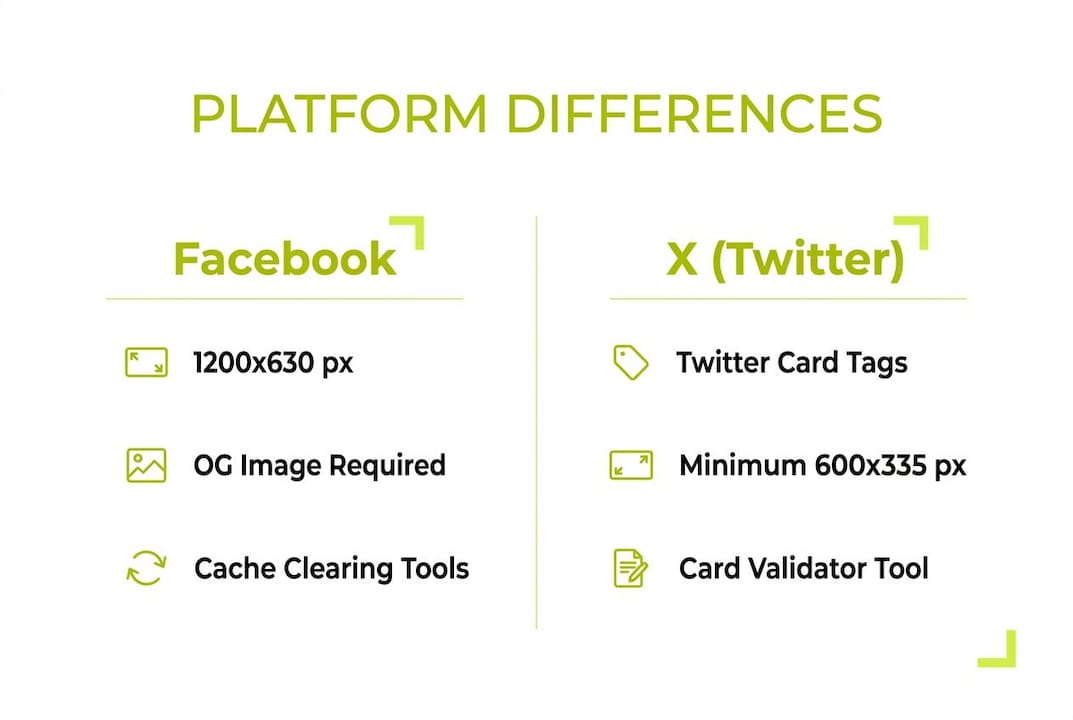
Every platform reads metadata through its own lens, and the differences can trip up even experienced marketers. Facebook recommends images sized appropriately for link previews and prioritizes Open Graph tags above all else. LinkedIn may fall back to raw page content if your og:image is missing or undersized. X requires Twitter Card tags alongside Open Graph tags rather than treating OG as sufficient on its own.

Image aspect ratios add another layer of complexity. Facebook and LinkedIn both favor the 1.91:1 ratio at 1200×630 pixels, while X’s summary_large_image card type works best at 1200×675 pixels. Slack and Discord follow Open Graph conventions but render cards in compact formats that crop aggressively, so keeping critical visual elements away from image edges protects your brand presentation.
Platform requirements summary:
- Facebook: 1200×630 px image, Open Graph tags required, absolute HTTPS image URLs
- X: Twitter Card tags plus Open Graph,
summary_large_imagefor large previews - LinkedIn: Strict about image dimensions, falls back to page content without valid OG tags
- Slack and Discord: Open Graph driven, compact card rendering with edge cropping
- WhatsApp and Telegram: Open Graph tags, smaller image thumbnails displayed
Pro Tip: Run your URL through a multi-platform preview tool before every campaign launch. Catching a missing og:image on LinkedIn before you push paid traffic saves you from paying for clicks that land on a broken-looking card.
Consistent branding across platforms rarely happens automatically. Multi-platform preview tools let you tailor metadata to each platform’s rendering rules rather than hoping a single tag set works everywhere.
Why link preview generators improve your campaign results
Auditing your link’s “social health” before publishing is one of the fastest ways to protect campaign performance. A polished preview card with the right image and a sharp headline earns more clicks than a bare URL, and a broken preview actively signals low quality to the people you are trying to reach. Using a URL preview tool lets you catch missing images, truncated titles, and wrong descriptions before your audience does.
The brand consistency payoff compounds across channels. Every time someone shares your link in a Slack channel, a WhatsApp group, or a LinkedIn post, the preview is your first impression. Getting that impression right across all surfaces is what separates campaigns that build brand equity from ones that quietly erode it.
Practical benefits for marketers:
- Prevents embarrassing broken previews on paid and organic posts
- Saves time by catching metadata issues before content goes live
- Enables cross-platform optimization from a single audit step
- Supports bulk URL checking for agencies managing multiple clients
- API access lets teams automate preview validation at scale
For teams running retargeting campaigns, preview quality and pixel performance are connected. A link that looks professional in the preview earns the click, and the retargeting pixel fires on that click. Weak previews reduce click volume, which shrinks your retargeting audience before the pixel even has a chance to work.
Best practices for getting accurate previews every time
Verify that your Open Graph and Twitter Card meta tags are present and correct at the server level. This is the single most common source of preview failures. Meta tags injected via client-side JavaScript are ignored by social media crawlers, which only read the initial HTML response from your server.
Redirects can cause preview tools to display metadata from an intermediate URL rather than your final landing page. Run a redirect checker on any link that passes through a shortener or tracking parameter chain before generating a preview, so you confirm the tool is reading the right page.
Caching is the other major headache. Social platforms cache previews aggressively, sometimes for days, so updating your tags does not automatically refresh what users see. Use Facebook’s Sharing Debugger, LinkedIn’s Post Inspector, or X’s Card Validator to force a fresh fetch after any metadata change.
Best practice checklist:
- Use server-side meta tags only; never rely on JavaScript injection
- Keep
og:imageURLs absolute and starting with HTTPS - Stay within 60 characters for titles and 155 characters for descriptions to avoid truncation
- Run a redirect check before previewing any link that goes through a shortener
- Clear platform caches with official debugger tools after updating tags
- Use suitably sized images optimized for each platform as your default.
Pro Tip: Test local development URLs with a preview tool that supports localhost or staging environments before pushing to production. Catching a missing tag in development costs nothing; catching it after a campaign launches costs clicks.
How Link Squeeze supports your link preview workflow
Link Squeeze includes a free link preview generator that lets you check how any URL renders across major platforms without signing up. Alongside it, the platform offers a free Open Graph tag generator for building or correcting metadata directly. Both tools sit within a broader suite designed for marketers who need preview quality and campaign performance to work together.
Where Link Squeeze goes beyond a standalone preview checker is in the integration layer. Every shortened link can carry retargeting pixels for Meta, TikTok, and Pinterest, turning each click on a well-optimized preview into a retargeting audience signal. Analytics track click demographics so you can see who is engaging with each link, not just how many people clicked.
Shopify merchants get an additional layer of value through order and revenue attribution tied to tracked short links. When a preview-optimized link drives a purchase, that conversion connects back to the specific link and campaign that generated it.
Link Squeeze features for preview-driven marketing:
- Built-in link preview generator and Open Graph tag generator, both free
- Retargeting pixel support for Meta, TikTok, and Pinterest on every link
- Click analytics with demographic breakdowns for campaign optimization
- Shopify integration for order and revenue attribution
- Branded short links with custom domains for consistent presentation
Common challenges and how to troubleshoot them
The most frequent preview problem is a missing or inaccessible og:image. Check that the image URL is absolute, starts with HTTPS, and loads in a private browser window without authentication. Facebook requires images above a minimum size, and smaller images risk being displayed as a small thumbnail rather than a large card.
Wrong titles or descriptions appearing in previews almost always point to a caching issue rather than a tag error. If you have confirmed your tags are correct in the page source but the old preview still shows, use the platform’s official debugger to force a re-scrape. Adding a cache-busting query string to your og:image URL also helps when the image itself changed but the URL did not.
Generic previews with no image and a pulled-from-page-content description mean Open Graph tags are absent entirely. Platforms fall back to guessing, and the result is rarely useful. Always set explicit og:title, og:description, and og:image tags on every public page you plan to share.
Comparing link preview tool categories by feature set
Preview tools fall into a few distinct categories based on what marketers actually need from them.
Single-URL checkers are the most common free option. You paste a URL, get a visual rendering across platforms, and see which tags are present or missing. They work well for one-off audits and pre-publish checks. The tradeoff is that checking a site with dozens of landing pages one URL at a time does not scale.
Multi-platform validators go a step further by showing previews for Facebook, X, LinkedIn, Slack, Discord, and sometimes Google Search simultaneously. This matters when your campaign runs across several channels and you need to confirm the preview looks right on each one without switching between tools.
Bulk processing tools handle up to 100 URLs at once with export options in JSON or CSV format. Agencies and larger marketing teams use these to audit entire site sections or client portfolios in a single pass rather than checking pages individually.
API-based generators let developers and marketing operations teams automate preview validation inside their own platforms. A single GET request returns structured metadata for any URL, which makes it straightforward to build preview checks into a content publishing workflow or a campaign management system.
Integrated link management platforms like Link Squeeze combine preview generation with short links, retargeting pixels, and analytics in one place. For performance marketers, this means preview quality and campaign tracking live in the same workflow rather than across separate tools.
Key Takeaways
A link preview generator is the fastest way to protect campaign performance by confirming your metadata is correct before any audience sees your links.
| Point | Details |
|---|---|
| Platform requirements vary | Facebook needs 1200×630 px images; X requires Twitter Card tags alongside Open Graph; LinkedIn falls back to page content without valid tags. |
| Server-side tags only | Social crawlers ignore JavaScript-injected meta tags and only read the initial HTML response. |
| Cache clearing is required | After updating metadata, use platform debuggers like Facebook’s Sharing Debugger to force a fresh preview fetch. |
| Redirects affect accuracy | Run a redirect check before previewing any link that passes through a shortener to confirm the tool reads the final page. |
| Link Squeeze combines preview and retargeting | Link Squeeze’s free preview generator pairs with pixel-enabled short links and click analytics for full campaign visibility. |
Link Squeeze gives you preview quality and campaign performance together
Most marketers use a standalone URL preview tool for audits and a separate platform for retargeting and analytics. Link Squeeze closes that gap. You get a free preview generator built into the same platform where you create pixel-enabled short links, track click demographics, and attribute revenue for Shopify campaigns.
For social media managers and performance marketers who need every link to look right and perform, Link Squeeze connects the two. Check your previews, attach your Meta, TikTok, or Pinterest pixels, and share links that build retargeting audiences with every click. Visit the social media manager tools page to see the full feature set and start for free.
FAQ
What does a link preview generator actually do?
A link preview generator fetches a URL’s Open Graph and Twitter Card meta tags and renders a visual card showing the title, description, and image, exactly as social platforms and messaging apps will display it.
Why is my link preview showing the wrong image?
The og:image tag is either missing, uses a relative URL instead of an absolute HTTPS URL, or the image dimensions are too small. Use a preview tool to inspect the tag and confirm the image loads publicly.
How do I fix a stale link preview after updating my tags?
Use platform-specific cache-clearing tools: Facebook’s Sharing Debugger, LinkedIn’s Post Inspector, or X’s Card Validator. These force the platform to re-scrape your page and display the updated preview.
Can I test link previews before my page goes live?
Yes. Some preview tools support local or staging environment URLs, letting you verify meta tags before pushing to production and avoiding errors on live campaigns.
Does Link Squeeze include a free link preview tool?
Yes. Link Squeeze provides a free link preview generator and an Open Graph tag generator as part of its free marketing tools, with no signup required for basic use.